Portal 9.5 Error

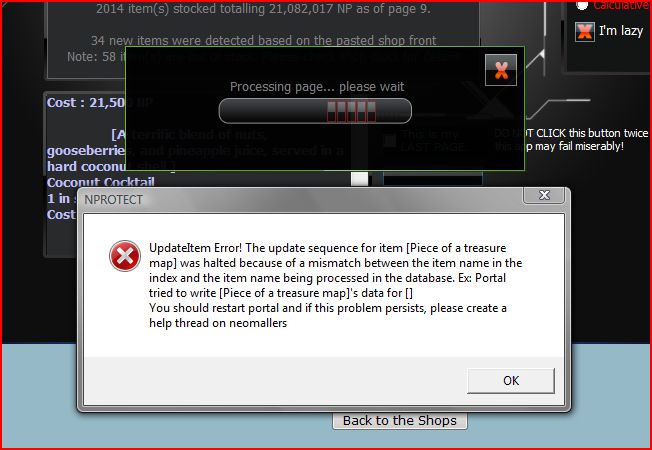
I tried posting my shop front this morning and got an error on the very first item. Piece of a treasure map isn't even in my data base. (I don't keep track of those) I restarted it twice and finally didn't copy and paste that item and the rest of it worked fine. I'm using FF 3.5.7 Window Vista Home Premium Service Pack 2 32 bit OS The Piece of a treasure map error is attached below. Should I just add it to my database? Thanks for any input
AttachmentSize
Image icon piece of error.JPG59.73 KB

That's odd. My guess is, such an entry exists somewhere in the database (invisible) since i just tried pasting your shop front into my database and it didnt say anything -------------------------------------------------------------- [url=http://www.neopets.com/pirates/smugglerscove.phtml?thanks=24698]Get a SuAP[/url]
----------------------------- [color=purple]Protect your account[/color] http://www.neopets.com/~punchback_bob CG information & more

I did try keeping track of them way back. I went back and inputted my shop front in Portal 9.0.0 and it worked just fine. I tried adding Piece of a treasure map into Portal 9.5 Now it (Piece of a treasure map) works but the second item "Bath Tub" says that "the item Bath Tub appears to be corrupted. Mismatch between index and data! And I get the same error seen above:( http://www.neopets.com/browseshop.phtml?owner=atlantissix
http://www.neopets.com/browseshop.phtml?owner=atlantissix

All right, can you send me a zip file of the profile? Something must be weird and probably fastest to check it out myself (just attach it somewhere) -------------------------------------------------------------- [url=http://www.neopets.com/pirates/smugglerscove.phtml?thanks=24698]Get a SuAP[/url]
----------------------------- [color=purple]Protect your account[/color] http://www.neopets.com/~punchback_bob CG information & more

or what you can do is open up your db_shopstock folder in your users/profile folder and open data_shopstock or something using notepad. If there are blank entries at the top, remove them -------------------------------------------------------------- [url=http://www.neopets.com/pirates/smugglerscove.phtml?thanks=24698]Get a SuAP[/url]
----------------------------- [color=purple]Protect your account[/color] http://www.neopets.com/~punchback_bob CG information & more

How do I do that? Step by step for the computer impaired *unsure* http://www.neopets.com/browseshop.phtml?owner=atlantissix
http://www.neopets.com/browseshop.phtml?owner=atlantissix

-------------------------------------------------------------- [url=http://www.neopets.com/pirates/smugglerscove.phtml?thanks=24698]Get a SuAP[/url][KB#02 - Preparing Compressed folders to package users directory] To do this, open up the users folder (in C:\neomallers if default settings used) and right click the profile in question. Choose send to compressed folders. A file will be created. Please attach that file to your post using file attachment dropdown and if possible, provide any details of what you were doing when you experienced the glitches
----------------------------- [color=purple]Protect your account[/color] http://www.neopets.com/~punchback_bob CG information & more

Thanks, hope I did this right. http://www.neopets.com/browseshop.phtml?owner=atlantissix
http://www.neopets.com/browseshop.phtml?owner=atlantissix

no you need to upload the users folder, not the portal file itself. -------------------------------------------------------------- [url=http://www.neopets.com/pirates/smugglerscove.phtml?thanks=24698]Get a SuAP[/url]
----------------------------- [color=purple]Protect your account[/color] http://www.neopets.com/~punchback_bob CG information & more

Tries this again *unsure* http://www.neopets.com/browseshop.phtml?owner=atlantissix EDIT: got it
http://www.neopets.com/browseshop.phtml?owner=atlantissix

which profile were you using? -------------------------------------------------------------- [url=http://www.neopets.com/pirates/smugglerscove.phtml?thanks=24698]Get a SuAP[/url]
----------------------------- [color=purple]Protect your account[/color] http://www.neopets.com/~punchback_bob CG information & more

Pages