Bad install

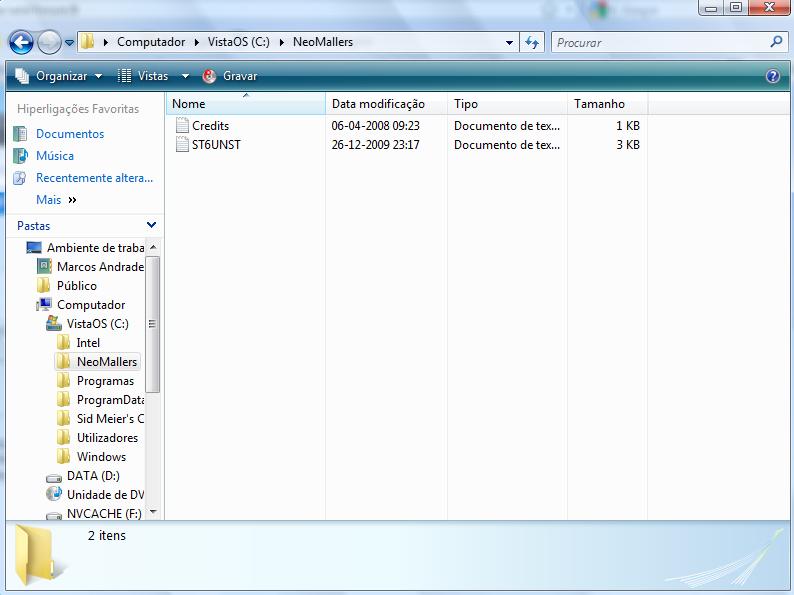
Hi, I've been trying to install the sales tracker but something weird happens. I download the file (yes, the right one), open it, install it, nothing wrong happens, I get the message of sucessfull instalation but... when I go to the folder there's only 2 files there (see screenshot). It's getting frustrating. I'm using Windows Vista. Thanks in advance for the help.
AttachmentSize
Image icon bad install.jpg52.21 KB

Odd :o I'm gonna reboot into windows 7 then --------------------------------------------- Celebrate [color=red]Xmas[/color] at [color=green]Xmart[/color]. Buy a tent for your pet today! http://www.neopets.com/browseshop.phtml?owner=dmitri_stanislaus
----------------------------- [color=purple]Protect your account[/color] http://www.neopets.com/~punchback_bob CG information & more

I'm using Windows XP (same operating system I was using on my first install of the portal program) if it's of any help.

Ok i just ran the new one through windows XP and Windows 7 in a new directory and it works (all files are installed correctly). The old one however did not --------------------------------------------- Celebrate [color=red]Xmas[/color] at [color=green]Xmart[/color]. Buy a tent for your pet today! http://www.neopets.com/browseshop.phtml?owner=dmitri_stanislaus
----------------------------- [color=purple]Protect your account[/color] http://www.neopets.com/~punchback_bob CG information & more

I just deleted my older installer, re-downloaded and installed in a new directory, same issue. 2 text files, one called Credits and the other ST6UNST. I just don't get it.

Wow... I'm glad that contrary to popular belief I'm not an idiot that can't install a program if his life deppends on it. Thanks cerberus_neo for your way around it. It does work, I had to manually register one of the .dll's since I'd never had the program before, but that was no problem. And the program is really great.

Yeah it's weird since it works perfectly for me now. Dont know about the other people here since they have stopped responding/or havent tried the new installer --------------------------------------------- Celebrate [color=red]Xmas[/color] at [color=green]Xmart[/color]. Buy a tent for your pet today! http://www.neopets.com/browseshop.phtml?owner=dmitri_stanislaus
----------------------------- [color=purple]Protect your account[/color] http://www.neopets.com/~punchback_bob CG information & more

At least there's an alternative which works, I just don't understand what's interfering with the installer. If there's anything I can do to help resolve the issue, provide information about my computer or anything please let me know. I'd be glad to lend a hand if possible, although bear in mind I'm not very knowledgeable in computer talk =P

Well what you can do is install teamviewer (i think there's a thread about this somewhere and send me the 9 digit ID and access code over PM and i can take a look at it myself) Anyways I gotta reboot back into XP since all my stuff is on there :P EDIT: Ok i'm back into XP now --------------------------------------------- Celebrate [color=red]Xmas[/color] at [color=green]Xmart[/color]. Buy a tent for your pet today! http://www.neopets.com/browseshop.phtml?owner=dmitri_stanislaus
----------------------------- [color=purple]Protect your account[/color] http://www.neopets.com/~punchback_bob CG information & more

http://www.neomallers.com/node/2268?page=1 teamviewer stuff is somewhere there --------------------------------------------- Celebrate [color=red]Xmas[/color] at [color=green]Xmart[/color]. Buy a tent for your pet today! http://www.neopets.com/browseshop.phtml?owner=dmitri_stanislaus
----------------------------- [color=purple]Protect your account[/color] http://www.neopets.com/~punchback_bob CG information & more

PMed you the info, not sure if I've done this right though.

Pages