
Protecting against Neopets Cookie Grabber (CGer) Guide
Welcome to the in-depth guide to avoiding cookie grabbers. This page has been generated from background information of how it works, reverse engineering of various neo CGs and 1st hand research. (plus losing 800k + trades along the way, but hey, it's priceless!!)
[SHORT VERSION]
For the in-depth version, please see http://www.neopets.com/~punchback_bob
Remember that Internet Explorer is vulnerable to on-site cookie grabbers (on neopets)
Opera users should use the userjs file called BlockScript. It's sorta complicated but it's here
Get firefox here: http://www.mozilla.com/en-US/firefox/firefox.html?from=getfirefox
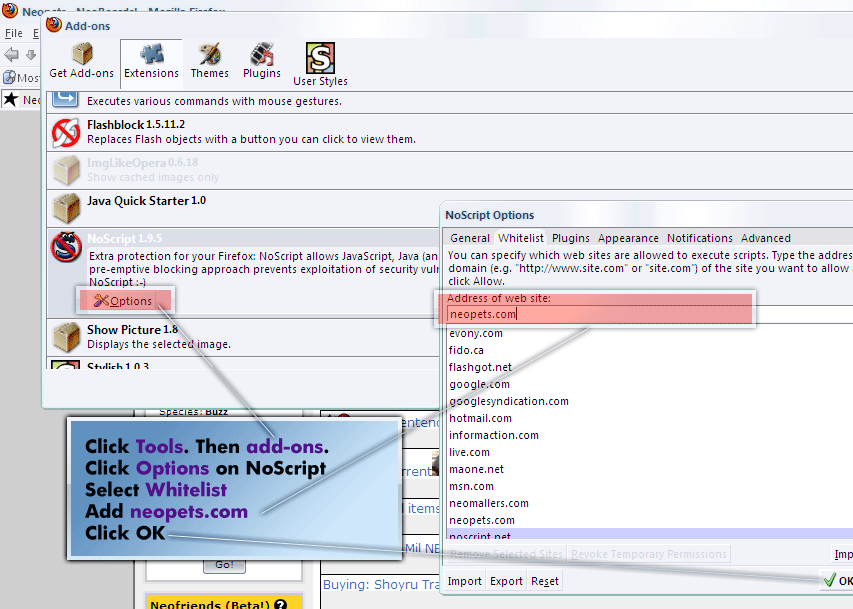
"NOSCRIPT" This helps block malicious scripts from running.
Don't forget to whitelist neopets.com and any other sites that you trust (like hotmail.com) (see attachment)
FLASHBLOCK This allows you to selectively load adobe flash player objects. If you need flash to play games, simply click the arrow to enable that object. This is allowed since most browsers don't even come with flash. Do not whitelist neopets as one type of CG uses a redirection of http://images.neopets.com/flash_version_check_v1.swf? to steal cookies.
KEYSCRAMBLER ADD-ON. For protection against key loggers (programs that record everything you type) It's no use changing your password if every key you press is being sent to the "hacker"
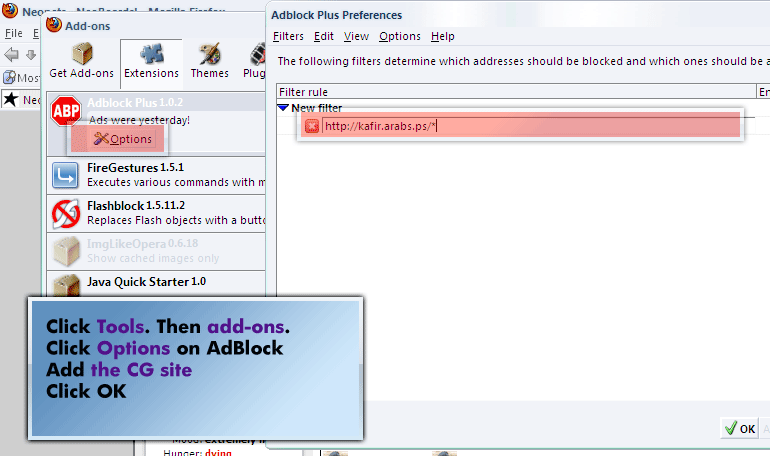
ADBLOCK. It allows you to block ads... and other things (like CGs) See attachment for more info
REQUESTPOLICY. RequestPolicy is an extension that improves the privacy and security of your browsing by giving you control over when cross-site requests are allowed by webpages you visit.
Think you got CG'd?
If you THINK you were CG'd, the first you should do is LOG OUT. Why? Because this invalidates the cookie that the "idiot" took. Try it yourself. Log into neo in another browser. You will see that you can browse neopets for a bit on both web browsers. Now click the log out button of one browser and see what happens. Contrary to popular belief, clearing cookies will do nothing for you. Just log out, get the keyscrambler add-on (if you can get it), and then log back in and THEN change your password
| Attachment | Size |
|---|---|
 whitelist-neopets.gif whitelist-neopets.gif | 74.73 KB |
| ablock-instructions.gif | 43.8 KB |
bumping this back up
how does the google chro
I'm setting up a second
I dont think i migrated
Looks neo finally hashed
Yup,I know that feeling
Pages